
BEM
block, block__element, block--modifier. Real classes.
The HTML to Webflow builder
Describe a site to the AI you already use, like ChatGPT, Claude or Cursor. It builds the page in real HTML, CSS and JavaScript through HTFlow, and HTFlow turns every section into native Webflow elements you can edit. It’s faster and much cheaper than having an AI drive Webflow directly. Your AI plan covers the AI, so we never bill you for it.
Checked against what Webflow can import
01 / 04
When an AI works directly through a visual builder, it may need to create the builder’s structured representation while it is also trying to make design decisions.
Why not generate Webflow directly?Connect HTFlow to Claude over MCP, describe the site, and watch it arrive as real Webflow-ready sections you can paste straight into the Designer.
WalkthroughBuild a Webflow website with Claude through the HTFlow MCP server
You do not need to know any of the machinery. You describe it, the agent builds it, HTFlow converts it, and you finish in the Designer like always.
Tell the agent what the page is for, in a sentence or two.
It writes HTML, CSS and JavaScript that is already Webflow-compatible.
Adjust it on the canvas, or ask for changes until it is right.
Copy it into Webflow and it lands as native Webflow elements.
The build step is the one that could go wrong, so it is the one that is constrained. The agent writes ordinary code, but only the subset Webflow can actually import.
block, block__element, block--modifier. Real classes.
991, 767 and 479 pixels. Webflow’s own breakpoints.
Semantic elements that map to real Webflow elements.
Vanilla HTML, CSS and JavaScript. No Tailwind, no jQuery, no CDN.
Of the work, before you open the Designer
Once HTFlow has generated the Webflow-compatible site, a designer can export it in minutes. Everything below is already done by the agent — the repetitive bulk of the build, finished before you open the Designer.
What is left for you in Webflow: turn the elements you reuse into components, swap in your own images, and any minor tweaking.
The same builder also exports to WordPress, or as plain HTML and CSS.
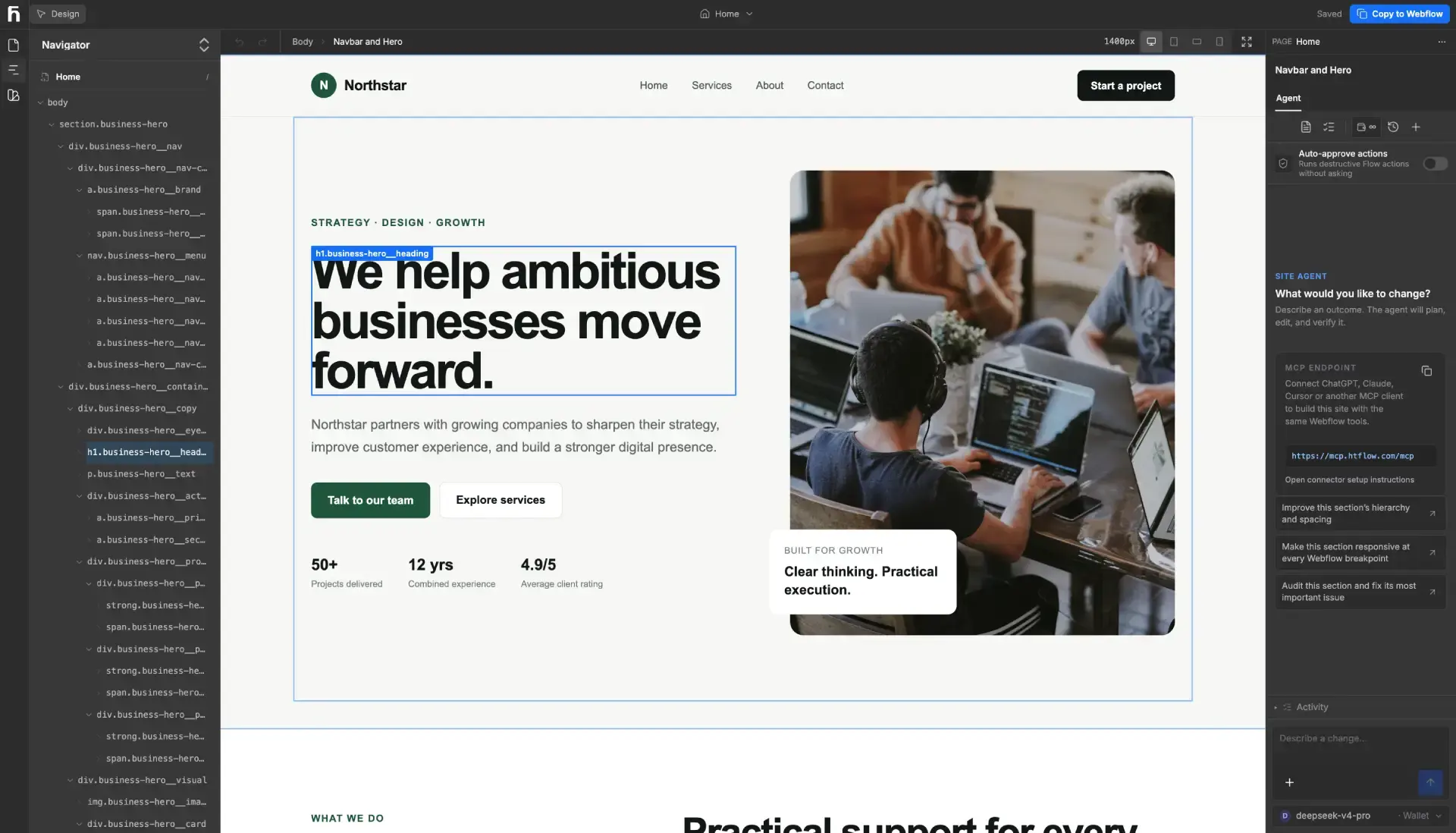
Select anything on the page and change it directly, or ask the agent for the change in a sentence.
Every element shows up in the navigator with its tag and class, so you always know what you are editing.
Desktop, tablet, mobile landscape and mobile—the same four breakpoints you get in the Designer.
Colours and type live in one place, so a change lands everywhere instead of section by section.
Step back through your own edits and the agent’s. Nothing it does is a one-way door.
The agent is held to what Webflow can import, so the export is not where you find out something broke.
HTFlow is an MCP server. Connect it once to the AI app you already use, and build Webflow sites from there on the plan you already pay for.
Set up the MCP connector ChatGPTChat app
 ClaudeChat app
 GeminiChat app
 KimiChat app
 GLMChat app
 CodexCoding agent
 Claude CodeCoding agent
Looking for plans and limits instead? See pricing
Describe the page you want and HTFlow's AI agent builds it in real HTML, CSS, and JavaScript, following a rulebook that keeps the markup Webflow-compatible. Refine it on a visual canvas, then press Export: HTFlow converts the page and copies it to your clipboard. Paste it into the Webflow Designer and keep working there.
Because the Webflow canvas does not store a web page. It stores structured data in Webflow's own format, which is compiled into HTML, CSS and JavaScript afterwards. An AI working through that API has to write the format rather than the code it knows best, which is slow, costs far more tokens, and pushes it toward simple layouts it is confident will import. HTFlow lets the agent write ordinary code and handles the conversion instead.
Yes. Headings, paragraphs, links, lists, images and form labels arrive as native Webflow elements with their own classes — not a custom-code embed you cannot edit in the Designer. Once the page is in, you can turn anything you reuse into a Webflow Component like any other project.
No. HTFlow does not sell AI credits and takes no margin on AI usage. You connect your own OpenRouter API key and your provider bills you directly at their price, or you skip keys altogether and drive the build from a ChatGPT or Claude subscription you already pay for through HTFlow's MCP server.
Yes. HTFlow runs an MCP server, so any MCP-compatible client — Claude, ChatGPT, Cursor, VS Code, Antigravity, Kiro, Kimi Code, Z Code and others — can build and edit the same site. The export into Webflow works the same either way.
Yes. The builder works at Webflow's own four viewports, and the agent styles each one, so the page arrives responsive rather than needing a second pass in the Designer.
Yes. The same build also converts to WordPress through Elementor and Kirki. You can also download plain HTML and CSS.
No. HTFlow is the builder, the Webflow rulebook and the conversion into native Webflow elements. The intelligence comes from whichever AI you connect — your own OpenRouter key in the built-in agent, or a ChatGPT, Claude or other MCP client driving it from outside.
It is the aim, not a promise. What the agent reliably covers is the repetitive bulk of the build — layout, responsive styles, typography and a first version of every page. After you paste into Webflow you still turn reusable elements into components, swap in your own images and make any minor tweaks, and complex CMS structures, ecommerce or custom logic still need a designer or developer.
Start free. Describe a page, refine it, and paste it into Webflow.